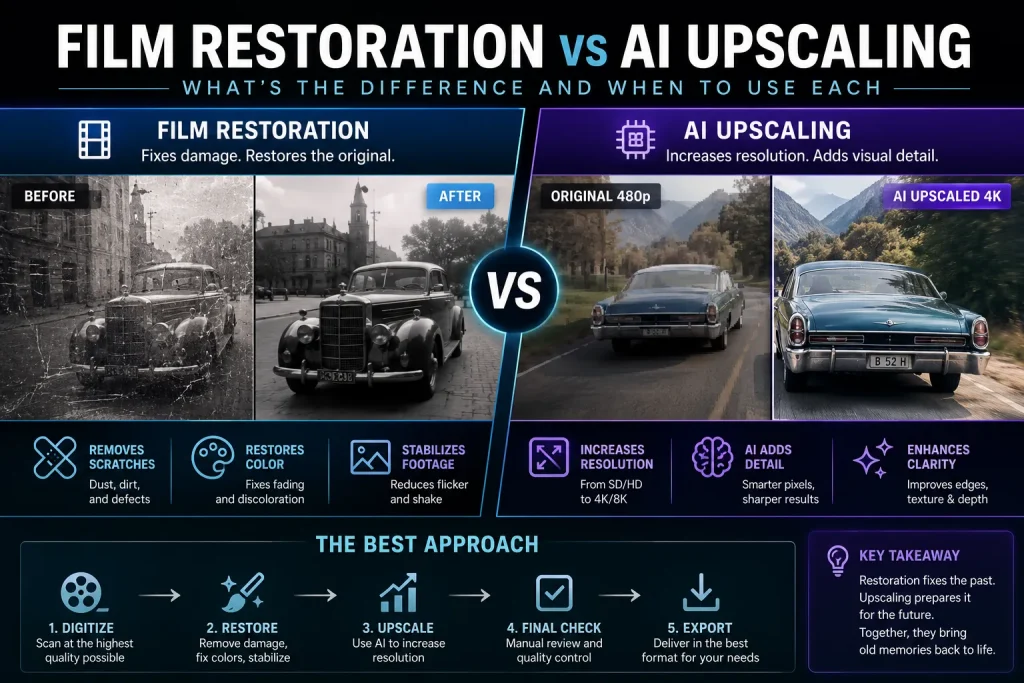
Film restoration repairs damage in old film or video, including scratches, dust, flicker, color fading, and missing frames. AI upscaling increases a video’s resolution using machine learning to generate additional detail. Restoration improves quality by fixing defects, while AI upscaling primarily improves sharpness and resolution. Professional restoration projects often combine both techniques.
Film restoration and AI upscaling serve different purposes but are frequently used together. Film restoration focuses on repairing visual defects, stabilizing footage, correcting colors, and recovering historical material. AI upscaling enlarges lower-resolution footage to HD, 4K, or even 8K by predicting additional image detail. Choosing the right method depends on whether the source material is damaged, low resolution, or both.
Quick Facts
| Feature | Film Restoration | AI Upscaling |
|---|---|---|
| Primary Goal | Repair damage | Increase resolution |
| Uses AI | Sometimes | Yes |
| Removes Scratches | ✅ | ❌ |
| Removes Dust | ✅ | ❌ |
| Improves Resolution | Sometimes | ✅ |
| Repairs Color Fade | ✅ | Limited |
| Best For | Historical footage | Low-resolution videos |
| Can Be Combined | ✅ | ✅ |
Key Takeaways
- Film restoration repairs damaged footage.
- AI upscaling increases image resolution.
- Restoration focuses on preserving original quality.
- AI upscaling enhances visual sharpness.
- Most professional workflows combine both techniques.
- AI cannot repair every type of physical film damage.
- Restoration is usually completed before upscaling.
Overview
Old films, VHS tapes, DVDs, and archived video recordings often suffer from two different problems: physical damage and low resolution.
Many people assume that AI can solve every issue with a single click, but that’s not how professional restoration works.
Understanding the difference between film restoration and AI upscaling helps you choose the right workflow for your project while avoiding unrealistic expectations.
Whether you’re restoring family memories, preserving historical footage, digitizing VHS tapes, or remastering classic films, knowing when to restore, when to upscale, and when to combine both techniques can dramatically improve the final result.
This guide explains the differences, advantages, limitations, costs, and best use cases for each approach.
Before You Start
Before choosing a restoration method, identify the condition of your source material.
Ask yourself:
- Is the video damaged?
- Is the resolution too low?
- Are colors faded?
- Does the footage flicker?
- Is the image noisy?
- Is it film, VHS, DVD, MiniDV, or digital video?
- Is preserving authenticity important?
Answering these questions makes it much easier to select the right workflow.
What Is Film Restoration?
Film restoration is the process of repairing and preserving damaged motion picture footage while maintaining its original appearance as faithfully as possible.
Professional restoration can include:
- Removing scratches
- Cleaning dust and dirt
- Repairing damaged frames
- Correcting color fading
- Stabilizing shaky footage
- Reducing flicker
- Removing film grain when appropriate
- Repairing tears
- Synchronizing audio
- Fixing exposure problems
The goal is preservation, not changing the artistic intent of the original production.
What Is AI Upscaling?
AI upscaling uses machine learning algorithms to increase the resolution of existing images or video.
Instead of simply stretching pixels like traditional scaling, AI analyzes patterns and predicts new detail, producing a sharper image.
Common output resolutions include:
- 720p
- 1080p
- 1440p
- 4K
- 8K
Popular AI upscalers can also improve:
- Edge sharpness
- Facial details
- Texture clarity
- Noise reduction
- Compression artifacts
Unlike restoration, AI upscaling does not repair physical film damage.
Why People Confuse the Two
Both technologies improve old footage, so they’re often mistaken for the same process.
However, they solve different problems.
Film restoration answers:
“How can I repair this damaged footage?”
AI upscaling answers:
“How can I make this video look sharper on modern displays?”
Understanding this distinction helps avoid disappointment and leads to better restoration results.
Why Professionals Use Both
Professional restoration studios rarely choose one method over the other.
Instead, the workflow is usually:
- Digitize the original source.
- Restore damage.
- Correct colors.
- Stabilize footage.
- Remove dust and scratches.
- Apply AI upscaling if higher resolution is needed.
- Perform final quality control.
This sequence produces significantly better results than applying AI upscaling to damaged footage.
Who Is This Guide For?
This guide is useful for:
- Film archivists
- Video editors
- Documentary producers
- YouTubers
- Content creators
- Museums
- Libraries
- Family historians
- VHS collectors
- Home movie enthusiasts
- Digital preservation specialists
Whether you’re restoring a Hollywood film or digitizing family memories, understanding these techniques helps you choose the right approach.
Common Search Questions
People often search for:
- Film restoration vs AI upscaling
- Can AI restore old movies?
- Does AI repair scratches?
- Best AI upscaling software
- Restore VHS to 4K
- AI video enhancement
- Difference between restoration and remastering
- Can AI restore damaged film?
These questions reflect growing interest in combining AI technology with traditional restoration techniques.
How Professionals Restore and Enhance Old Footage
Professional video restoration follows a structured workflow. Rather than applying AI immediately, experts first repair the source material and then enhance it if needed.
A typical workflow looks like this:
- Inspect the original source.
- Digitize the film or tape at the highest possible quality.
- Repair physical and digital defects.
- Stabilize the image.
- Correct color and exposure.
- Reduce noise and unwanted artifacts.
- Apply AI upscaling if a higher resolution is required.
- Perform manual quality control.
- Export the final master in the desired format.
Skipping the restoration stage often results in AI enlarging scratches, dust, and other imperfections instead of improving the video.
When Should You Use Film Restoration?
Film restoration is the right choice when the original footage has visible damage or has deteriorated over time.
Typical situations include:
Old Motion Picture Film
Film reels may develop:
- Scratches
- Dust
- Mold
- Missing frames
- Color fading
- Flicker
- Warping
Restoration helps recover as much of the original image as possible while preserving historical authenticity.
Family Home Movies
Many family recordings suffer from:
- Color shifts
- Camera shake
- Tape degradation
- VHS tracking issues
- Image instability
Restoration improves viewing quality before any resolution enhancement is applied.
Historical Archives
Museums, libraries, broadcasters, and government archives often restore footage to preserve culturally important recordings for future generations.
Preservation—not modernization—is usually the primary goal.
Damaged Digital Files
Even digital recordings can benefit from restoration if they contain:
- Compression artifacts
- Flicker
- Sensor noise
- Frame instability
- Exposure problems
When Is AI Upscaling the Better Choice?
AI upscaling is ideal when the footage is already in good condition but lacks sufficient resolution for today’s displays.
Common examples include:
DVDs
Many DVDs are limited to standard definition.
AI upscaling can improve their appearance on HD and 4K televisions by increasing apparent detail.
Older Digital Cameras
Footage recorded in:
- 480p
- 720p
- Early 1080p
can often benefit from AI upscaling, especially when viewed on modern monitors.
YouTube Content
Creators frequently upscale older videos to improve presentation without reshooting the original content.
Social Media Archives
Businesses and creators often reuse older promotional videos.
AI upscaling helps those videos look better on newer platforms while maintaining the original content.
When Should You Use Both?
Many professional projects benefit from combining restoration and AI upscaling.
Examples include:
- Classic films
- Documentary footage
- VHS collections
- Betamax archives
- MiniDV tapes
- Wedding videos
- Family memories
- Television archives
The recommended workflow is:
Restore first. Upscale second.
This sequence minimizes unwanted artifacts and produces cleaner results.
Film Restoration vs AI Upscaling Comparison
| Feature | Film Restoration | AI Upscaling |
|---|---|---|
| Repairs scratches | ✅ | ❌ |
| Removes dust | ✅ | ❌ |
| Fixes color fading | ✅ | Limited |
| Repairs damaged frames | ✅ | ❌ |
| Stabilizes footage | ✅ | Some tools offer basic stabilization |
| Increases resolution | Limited | ✅ |
| Improves sharpness | Moderate | Excellent |
| Preserves historical accuracy | ✅ | Depends on settings |
| Best for damaged footage | ✅ | ❌ |
| Best for low-resolution footage | Limited | ✅ |
Real-World Examples
Example 1: VHS Family Tape
Problems
- Soft image
- Tracking noise
- Color fading
- Low resolution
Recommended workflow
- Restore tape defects
- Correct colors
- Stabilize video
- Apply AI upscaling to HD or 4K
Example 2: 35mm Motion Picture Film
Problems
- Dust
- Scratches
- Missing frames
- Film flicker
Recommended workflow
- Professional film restoration
- Frame repair
- Color grading
- AI upscaling if a higher-resolution digital master is required
Example 3: YouTube Video from 2012
Problems
- Low resolution
- Compression artifacts
Recommended workflow
- Light noise reduction
- AI upscaling
- Minimal restoration
Example 4: Smartphone Video
Problems
- Digital noise
- Slight blur
- Compression
Recommended workflow
- Noise reduction
- Stabilization
- AI upscaling if needed
Common Mistakes
Upscaling Before Restoration
One of the biggest mistakes is enlarging damaged footage before cleaning it.
AI often sharpens defects along with genuine image detail.
Expecting AI to Recover Missing Information
AI predicts additional detail.
It does not recover information that no longer exists in the source material.
Missing frames, severe motion blur, and heavily damaged scenes still require restoration techniques or manual repair.
Excessive Sharpening
Over-processing can create:
- Artificial textures
- Plastic-looking faces
- Halo effects
- Oversaturated colors
Natural-looking enhancement usually produces better long-term results.
Ignoring the Source Quality
No software can completely transform a severely degraded recording into perfect 4K video.
Starting with the highest-quality scan or digitization greatly improves the final result.
Cost Comparison
The cost varies depending on the project size, source condition, and desired quality.
| Service | Typical Cost |
|---|---|
| Basic AI Upscaling | Low |
| Consumer Restoration Software | Low to Moderate |
| Professional AI Enhancement | Moderate |
| Professional Film Restoration | High |
| Historical Archive Restoration | Very High |
Simple home videos may only require AI enhancement, while damaged archival film often requires many hours of manual restoration.
Which Method Produces Better Quality?
The answer depends on your objective.
Choose film restoration if your priority is:
- Preserving history
- Repairing damage
- Recovering original appearance
- Archival preservation
Choose AI upscaling if your priority is:
- Higher resolution
- Sharper presentation
- Better viewing on modern displays
Choose both if you want the highest-quality results for damaged, low-resolution footage.
Best Practices
Professionals generally recommend:
- Digitize from the highest-quality source available.
- Restore defects before enhancing resolution.
- Avoid excessive sharpening.
- Keep an untouched archival master.
- Export a high-quality preservation copy before creating compressed versions.
- Review the final output frame by frame when working on valuable footage.
Following these practices helps preserve both image quality and historical authenticity.
Film Restoration vs AI Upscaling by Media Type
Different media formats benefit from different restoration approaches. Understanding the characteristics of your source material helps you choose the right workflow.
| Media Type | Film Restoration | AI Upscaling | Best Approach |
|---|---|---|---|
| 8mm Film | ✅ Essential | ✅ Recommended | Restore first, then upscale |
| Super 8 Film | ✅ Essential | ✅ Recommended | Combine both |
| 16mm Film | ✅ Essential | ✅ Recommended | Professional restoration + AI |
| 35mm Film | ✅ Essential | Optional | Depends on the final delivery format |
| VHS | ✅ Recommended | ✅ Recommended | Restore first, upscale second |
| Betamax | ✅ Recommended | ✅ Recommended | Combined workflow |
| MiniDV | Light restoration | ✅ Recommended | AI upscaling after cleanup |
| DVD | Usually unnecessary | ✅ Best choice | AI upscaling |
| Blu-ray | Rarely needed | Sometimes | Minimal enhancement |
| Digital HD Video | Limited | Sometimes | Depends on source quality |
Common Myths About AI Upscaling
As AI-powered video enhancement has become more popular, several misconceptions have emerged.
Myth 1: AI Can Restore Any Damaged Video
Reality
AI upscaling improves resolution, but it cannot automatically repair severe scratches, torn film, missing frames, or extensive physical damage.
Myth 2: Upscaling Creates Real Missing Detail
Reality
AI predicts additional image information based on patterns learned during training.
While the results can look remarkably realistic, the newly generated detail is an estimation—not recovered original information.
Myth 3: 480p Can Always Become Perfect 4K
Reality
Although AI can significantly improve perceived sharpness, the final quality is always limited by the original recording.
Poor source material remains a limiting factor.
Myth 4: More Sharpening Always Looks Better
Reality
Excessive sharpening often creates:
- Halo artifacts
- Artificial textures
- Unrealistic skin
- Oversaturated edges
Professional restoration aims for natural-looking results rather than maximum sharpness.
Myth 5: Restoration Is Only for Old Movies
Reality
Modern digital footage can also benefit from restoration techniques such as:
- Noise reduction
- Stabilization
- Flicker removal
- Color correction
- Compression artifact cleanup
Frequently Asked Questions
What is the difference between film restoration and AI upscaling?
Film restoration repairs damaged footage by correcting defects such as scratches, dust, flicker, faded colors, and instability. AI upscaling increases the video’s resolution using machine learning to create additional image detail.
Which should I do first?
Professionals almost always recommend:
Restore first. Upscale second.
Cleaning the footage before increasing its resolution prevents defects from becoming more noticeable.
Can AI repair scratches?
Some AI tools can reduce the appearance of minor scratches, but severe physical damage usually requires dedicated restoration software or manual frame repair.
Can AI restore missing frames?
Not completely.
Frame interpolation tools can generate intermediate frames to improve motion, but they cannot accurately recover missing original content.
Does AI improve VHS tapes?
Yes.
AI upscaling can significantly improve VHS footage after restoration removes tracking noise, color shifts, and instability.
Is AI upscaling suitable for old movies?
Yes.
Many remastering projects combine traditional restoration with AI upscaling to prepare classic films for modern HD and 4K displays.
Does film restoration remove grain?
Not necessarily.
Natural film grain is part of the original image.
Professional restoration generally removes unwanted defects while preserving appropriate grain whenever possible.
Can smartphones use AI upscaling?
Yes.
Several mobile applications offer AI-based enhancement, although desktop software typically provides more control and higher-quality results.
Is 8K upscaling worth it?
For most home videos, 4K provides an excellent balance between quality and file size.
8K is generally reserved for professional workflows, archival projects, or very large displays.
Does AI colorize black-and-white films?
Some AI tools can assist with colorization, but professional colorization projects usually require significant manual review and artistic decisions.
Is film restoration expensive?
Costs vary depending on:
- Source condition
- Project length
- Required manual work
- Desired output quality
Simple consumer projects may be inexpensive, while historical film restoration can require extensive professional work.
Can I restore videos at home?
Yes.
Many restoration and AI enhancement tools are suitable for hobbyists and home users, although professional restoration remains the best option for valuable archival material.
Does AI replace human restoration experts?
No.
AI accelerates many repetitive tasks, but experienced restoration specialists remain essential for quality control, historical accuracy, and complex repairs.
Which method gives the best results?
For damaged, low-resolution footage, combining film restoration and AI upscaling generally produces the highest-quality outcome.
Expert Recommendations
After reviewing modern restoration workflows, several best practices consistently stand out.
Choose film restoration when:
- The footage has physical damage.
- Colors have faded.
- The image flickers.
- Frames are unstable.
- Historical preservation is important.
Choose AI upscaling when:
- Resolution is the primary limitation.
- The source is already relatively clean.
- You need HD or 4K delivery.
- You want improved viewing on modern displays.
Combine both methods when:
- Restoring archival footage.
- Digitizing VHS collections.
- Preserving family films.
- Preparing documentaries.
- Remastering classic movies.
This combined approach is used by many professional restoration studios because it addresses both image quality and historical preservation.
How We Verified This Information
This guide is based on:
- Established digital preservation practices used by archives and restoration studios.
- Common workflows employed in professional film restoration.
- Current capabilities and limitations of AI-based video upscaling technologies.
- Industry-standard post-production techniques for video enhancement.
Because software capabilities evolve rapidly, specific features may differ between restoration and AI upscaling tools.
Final Thoughts
Film restoration and AI upscaling are complementary technologies rather than competing solutions.
Film restoration focuses on repairing damage and preserving the original footage, while AI upscaling focuses on improving resolution and perceived image quality for modern displays.
If your footage is damaged, restoration should always come first. Once defects have been repaired and colors corrected, AI upscaling can produce a sharper, higher-resolution version suitable for HD, 4K, or even 8K viewing.
For family videos, historical archives, documentaries, and commercial remastering projects, combining both techniques typically delivers the most natural and visually impressive results.
As AI continues to evolve, it will become an even more valuable tool in professional restoration workflows. However, expert human oversight remains essential for preserving authenticity, ensuring historical accuracy, and making creative restoration decisions that automated systems cannot fully replicate.
Quick Comparison
| Question | Film Restoration | AI Upscaling |
|---|---|---|
| Repairs physical damage | ✅ | ❌ |
| Removes dust and scratches | ✅ | ❌ |
| Corrects faded colors | ✅ | Limited |
| Increases resolution | Limited | ✅ |
| Preserves historical authenticity | ✅ | Depends on settings |
| Best for damaged footage | ✅ | ❌ |
| Best for low-resolution footage | Limited | ✅ |
| Professional workflow | First step | Second step |