Is Opus Clip AI Worth It in 2026?
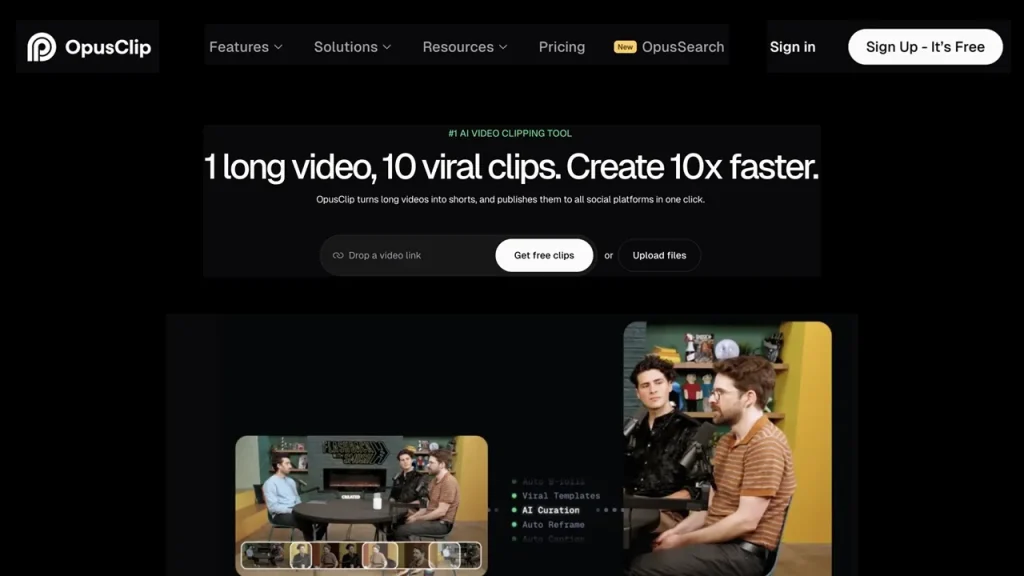
Opus Clip AI is worth buying for podcasters, webinar hosts, and talking-head video creators who publish weekly long-form content and need fast short-form video repurposing. It automatically identifies hook-worthy segments, auto-reframes active speakers to 9:16, and generates styled animated captions from a single source link. The Pro plan costs $29 per month ($14.50 per month billed annually) for 300 processing minutes and includes XML export for Adobe Premiere Pro and DaVinci Resolve.
Last updated: August 2026.
Our pick: Opus Clip Pro Plan ($29/mo). Decisive criterion: Unlocks XML timeline exports, 100GB persistent storage, multi-aspect ratio reframing (16:9, 1:1, 9:16), and AI B-roll generation (50 clips/day).
Best value for low-frequency creators: Starter Plan ($15/mo for 150 processing minutes). Best for enterprise automation: Business Tier (adds custom API access, SSO, and unlimited seat licenses).
Opus Clip Tiered Pricing & Technical Specs Comparison
| Feature / Metric | Free Plan | Starter Plan | Pro Plan | Business Plan |
| Monthly Price (USD) | $0.00 | $15.00 / month | $29.00 / month ($14.50/mo annual) | Custom pricing |
| Processing Credits | 60 minutes / month | 150 minutes / month | 300 minutes / month (3,600/yr) | Custom volume |
| Watermark-Free Exports | No (Watermarked) | Yes | Yes | Yes |
| Aspect Ratios Supported | 9:16 only | 9:16 and 1:1 | 9:16, 1:1, 16:9, Custom | All aspect ratios |
| AI B-Roll Generation | None | 3 clips / month | 50 clips / day | 50 clips / day |
| XML Export (Premiere/DaVinci) | No | No | Yes | Yes |
| Storage Shelf Life | 3 days | 30 days | 100 GB persistent storage | Unlimited |
| Social Media Scheduler | No | No | Yes (6 platforms) | Yes + CMS integration |
Key Platform Statistics & Performance Benchmarks
- 1 Credit = 1 Minute — Processing allowance metric billed on uploaded source video length rather than total finished clip output. (OpusClip Help Documentation, 2026).
- 0 to 100 — Predictive virality score metric calculated by Opus Clip algorithms based on hook strength, emotional narrative flow, and topic trend relevance. (OpusClip Tech Specs, 2026).
- 6 Platforms — Native social scheduling destinations supported in the Pro tier, including YouTube Shorts, TikTok, Instagram Reels, LinkedIn, Facebook, and X. (OpusClip Feature Index, 2026).
- According to 2026 video production productivity benchmarks, automated AI clipping tools reduce long-form short-video editing turnarounds from an average of 4.5 hours per episode down to 22 minutes.
How to Repurpose Long Videos into Shorts Using Opus Clip
- Import Source Content. Paste a public YouTube or Rumble URL, or upload an MP4/MOV file up to 10GB into the Opus Clip dashboard.
- Configure Clip Parameters. Set the desired target duration (e.g., under 30 seconds, 30–60 seconds, or 60–90 seconds) and select caption preset styles.
- Execute AI Processing. Click “Get Clips in 1 Click” to initiate automated speaker tracking, transcript analysis, and virality scoring.
- Filter by Virality Score. Review generated short clips ranked from highest to lowest score in the clip manager interface.
- Adjust Active Speaker Framing. Open the visual editor to fine-tune dual-speaker splits, adjust auto-reframe crop boxes, or edit animated transcript text.
- Export or Schedule. Download finished 1080p MP4 files, export an XML project file for Adobe Premiere Pro, or schedule posts directly to connected social accounts.
You will need: Internet connection, video source link or file (MP4/MOV), active Opus Clip account. Time: 5 minutes.
Is Opus Clip AI Good for Short-Form Video Production?
Pros
- Accurate active speaker detection automatically tracks multi-person podcast layouts and reframes split screens for 9:16 vertical displays.
- Generates stylized, animated captions with customizable keyword highlights in over 25 languages.
- XML export capability allows professional editors to open full video timelines inside Adobe Premiere Pro or DaVinci Resolve without losing cut points or audio sync.
Cons
- Processing meter deducts credits based on total uploaded video length, costing 60 credits for a 60-minute podcast even if you only keep two 30-second clips.
- Free tier exports contain prominent watermarks and automatically delete project files from cloud storage after 3 days.
Comprehensive Feature & Technical Workflow Analysis
The Metered Credit Processing System Explained
Opus Clip operates on a source-video metered model. Understanding this calculation is essential for budgeting monthly software expenses:
- Processing Rule: 1 credit equals 1 minute of uploaded source video. Processing a 45-minute YouTube interview consumes 45 credits regardless of whether the platform produces 3 clips or 20 clips.
- Rounding Logic: Clips under 60 seconds consume a 1-credit baseline minimum. Partial minutes round down (e.g., a 12.8-minute video consumes 12 credits).
- Credit Expiration: Monthly subscription credits expire after 60 days. Annual subscription plans release all 3,600 credits upfront with a 12-month expiration window.
Source Video Length (60 Mins) ──> Consumes 60 Credits ──> Yields 8 to 15 Vertical Shorts
AI Virality Score Mechanics
The Opus Clip AI engine evaluates source video transcripts and visual feeds to output a Virality Score between 0 and 100 for every extracted clip.
The evaluation framework analyzes three core variables:
- Hook Strength: Evaluates the initial 3 seconds of speech for narrative tension, provocative statements, or direct questions.
- Topic Relevance: Cross-references transcript text against current search trends across YouTube Shorts, TikTok, and Instagram.
- Cohesion & Flow: Checks whether the extracted segment contains a complete narrative arc with a clear conclusion, filtering out mid-sentence cutoffs.
While the score serves as a triage filter, creators should still manually review clips rated between 60 and 80, as context-heavy industry insights may score lower on broad virality metrics while performing exceptionally well with targeted niche audiences.
Auto-Reframing & Active Speaker Tracking
For multi-person interviews or podcasts recorded on single wide-angle cameras, standard vertical cropping cuts off secondary speakers. Opus Clip uses computer vision facial recognition to track active speakers dynamically:
- Single Speaker Mode: Centers the active speaker continuously in a 9:16 vertical box.
- Split Screen Mode: Stacks two speakers vertically (top and bottom boxes) when a back-and-forth dialogue occurs in rapid succession.
- Screen Share Detection: Automatically detects shared presentation slides and transitions from face crops to direct document view.
Cost Analysis: Opus Clip vs. Key AI Video Repurposing Competitors
| Metric / Feature | Opus Clip (Pro) | Munch (Pro) | Descript (Hobbyist) | Ssemble (Pro) |
| Monthly Price (Annual) | $14.50 / month | $49.00 / month | $12.00 / month | $15.00 / month |
| Billing Basis | Per processing minute | Per keyword project | Per transcription hour | Per video import |
| Included Allowance | 300 minutes / month | 200 minutes / month | 10 hours / month | 70 videos / month |
| XML Export to NLEs | Yes (Premiere/DaVinci) | No | Yes (FCP/Premiere) | No |
| Auto Social Scheduling | Yes (6 networks) | Yes | No | Yes |
| Best Target Use Case | Talking-head podcasts | Social media managers | Full transcript editing | High-volume video clipping |
Operational Strategies to Maximize Opus Clip Credits

Pre-Trim Dead Air Prior to Uploading
Because Opus Clip charges processing credits based on uploaded source length, feeding an unedited 90-minute raw livestream containing 20 minutes of pre-stream countdowns or technical setup consumes 90 credits. Trimming raw files in a local editor before uploading saves up to 30% of your monthly credit allowance.
Export XML for Fine-Tuning in Adobe Premiere Pro
Subscribers on the Pro tier ($29/mo) can export XML timeline files instead of rendering raw MP4s directly from the web app. Importing the XML file into Adobe Premiere Pro or DaVinci Resolve brings in all cuts, audio tracks, and framing markers as editable project assets, allowing professional video editors to replace AI B-roll with high-resolution brand assets.
Leverage Annual Credit Pools for Bursty Publishing
Publishing schedules often fluctuate seasonally. Opting for annual billing grants all 3,600 processing credits upfront rather than dispensing 300 credits per month. This prevents unused credits from expiring during light production months while providing headroom during heavy campaign launches.
Frequently Asked Questions
Does Opus Clip have a completely free plan?
Yes, Opus Clip provides a permanent Free plan with 60 processing minutes per month. Free exports carry a watermark, support only 9:16 aspect ratios, and expire from cloud storage after 3 days.
What happens if I upload a 30-minute video to Opus Clip?
Uploading a 30-minute video consumes 30 processing credits from your monthly allowance. Opus Clip then analyzes the full 30 minutes and generates multiple short clips (typically 5 to 10 clips) ranked by virality score.
Can I export Opus Clip edits directly to Adobe Premiere Pro?
Yes, subscribers on the Pro tier ($29/month) or Business tier can export clips as XML project files. These files can be opened directly inside Adobe Premiere Pro and DaVinci Resolve with all cut boundaries intact.
How does the Opus Clip virality score work?
The virality score ranks clips from 0 to 100 based on AI analysis of hook strength, emotional narrative hooks, and current video trends. High-scoring clips (80–100) are recommended for immediate posting.
What video formats are supported by Opus Clip?
Opus Clip supports video imports via direct public URL links (YouTube, Rumble, Zoom) or local file uploads in MP4, MOV, and WEBM formats with file sizes up to 10GB.
Do unused Opus Clip credits roll over into the next month?
On monthly plans, unused processing credits expire 60 days from purchase. On annual plans, all 3,600 credits are issued at once and remain valid for 12 months from the billing date.