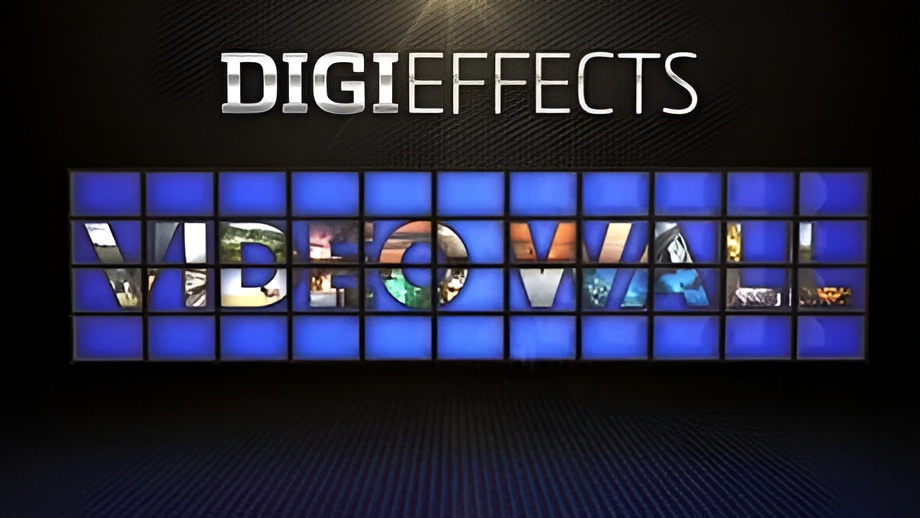
Digieffects Video Wall was an exciting, highly specialized post-production plugin that saved After Effects users hours of tedious layout time. Designed specifically for After Effects CS6 and early Creative Cloud (CC) environments, Video Wall allowed motion graphics artists to generate massive, procedural split-screen displays and control room monitors.
Rather than manually duplicating, scaling, and aligning individual video layers, this highly customizable and intuitive plugin allowed users to populate and animate up to 10,000 elements instantly. With dozens of parameters controlling cell arrangement, borders, and motion, editors could animate a dynamic video wall or flatscreen in a multitude of ways from a single control panel.
⚡ Quick Summary: Digieffects Video Wall
- Primary Function: Instant multi-screen grid creation, video wall animation, and massive matrix layout generation.
- Maximum Scale: Capable of generating and controlling up to 10,000 individual elements (grid cells) simultaneously.
- Key Features: Dozens of customizable parameters for animating walls or flatscreens, including row/column control, cell spacing, bevels, and rotation.
- Host Compatibility: Exclusively designed for Adobe After Effects CS6 and Creative Cloud (CC).
Technical Features & Core Controls
                        ┌─────────────────────────────────────────┐
                        │      DIGIEFFECTS VIDEO WALL ENGINE      │
                        └────────────────────┬────────────────────┘
                                             │
       ┌─────────────────────────────────────┼─────────────────────────────────────┐
       │                                     │                                     │
┌──────┴─────────┐                   ┌───────┴─────────┐                   ┌───────┴─────────┐
│ Massive Scale  │                   │ Frame & Surface │                   │ Dynamic Motion  │
│   Topology     │                   │   Stylization   │                   │  & Animation    │
├────────────────┤                   ├────────────────┤                   ├────────────────┤
│ • Up to 10,000 │                   │ • Border Width │                   │ • Flatscreen   │
│   Elements     │                   │ • Inner Bevel  │                   │   Animation    │
│ • Rows/Columns │                   │ • Drop Shadows │                   │ • Element Flip │
└────────────────┘                   └────────────────┘                   └────────────────┘
1. Massive Grid Generation (10,000 Elements)
- Extreme Scale Setup: Whether building a simple 4-panel split-screen or a massive broadcast control room with thousands of monitors, the engine could mathematically handle up to 10,000 video tiles without crashing the host application.
- Instant Matrix Layout: Users simply defined the row and column count. The plugin mathematically calculated the aspect ratio and position of every single cell instantly, bypassing the need to pre-compose hundreds of individual clips.
2. High Customization & Parameter Control
- Dozens of Parameters: Highly intuitive slider controls allowed editors to adjust bezel thickness, gap spacing, and overall flatscreen styling.
- 3D Glass & Bevel Edges: Artists could apply simulated edge shading and inner bevels to mimic physical monitor displays, giving the 2D grid a tangible, hardware-based aesthetic.
3. “A Multitude of Ways” to Animate
- Procedural Animation Engine: You didn’t just build a static wall; the plugin was designed to animate the flatscreen. Users could drive motion through the entire array seamlessly.
- Cell Offsetting & Randomization: Automatically invert, flip, or rotate select grid tiles to prevent the grid from looking like a perfect, static repeating pattern, bringing the massive wall to life.
The Workflow Revolution: Manual After Effects vs. Digieffects Video Wall
Before native grid generators evolved, creating a 100×100 matrix in After Effects CS6 was a nightmare of layer management.
| Feature / Workflow | Manual After Effects Pre-Comps | Digieffects Video Wall Plugin |
| Setup Time | Hours (Requires duplicating, scaling, & aligning layers). | Seconds (Slider adjustments for rows & columns). |
| Element Capacity | Timeline crashes around a few hundred layers. | Effortlessly rendered up to 10,000 elements. |
| Animation Control | Tedious keyframing across dozens of nested comps. | Unified “flatscreen” animation via dozens of built-in parameters. |
| Ease of Use | High complexity. | Highly customizable and very intuitive. |
Recreating Massive Video Walls in Modern After Effects
While Digieffects Video Wall was built specifically for CS6 and CC, modern editors can replicate this massive grid styling using today’s built-in tools:
- Apply CC RepeTile or Motion Tile: Drop your footage onto an After Effects timeline and apply the CC RepeTile effect. Expand the Right, Left, Up, and Down parameters to generate hundreds of repeating tiles.
- Add Grid Lines for Monitor Bezels: Apply the Grid effect over the RepeTile layer to instantly draw monitor bezels separating your “10,000 elements.” Adjust the border thickness and color to simulate a physical flatscreen array.
- Offset with Time Displacement: To animate the wall “a multitude of ways” like the original plugin, apply a Time Displacement effect using a fractal noise map to make different screens play back at slightly different speeds.
Frequently Asked Questions
What was Digieffects Video Wall?
It was a highly intuitive After Effects plugin that allowed users to instantly build, stylize, and animate procedural split-screen displays and flatscreen matrices.
How many video cells could Video Wall generate?
The plugin was optimized to generate and control up to 10,000 individual elements simultaneously on a single timeline.
Which host applications supported Video Wall?
The plugin was explicitly designed for Adobe After Effects CS6 and Creative Cloud (CC), saving AE users hours of manual timeline setup.