Originally published by Henrik “Leopold” Herranen, 1995–1998. Updated for modern readers.
Answer: Film transfer changes a movie from its original film frame rate and aspect ratio into a video format for television, discs, or streaming. The main challenges are preserving the image shape, choosing between letterboxing or cropping, and converting 24 fps film for video frame rates such as 25 fps or 29.97 fps.wikipedia+1
A movie can look very different at home than it did in a cinema. A wide theatrical image may gain black bars, lose picture information at the sides, reveal extra picture at the top and bottom, or play at a slightly different speed.
That is not always a mistake. It is often the result of a practical decision made during film transfer.
This guide explains the classic film-to-video process, why widescreen movies created problems for old 4:3 television sets, and how approaches such as letterboxing, pan and scan, open matte, Super 35, PAL speed-up and 3:2 pulldown worked.
Editorial Note
This article preserves the educational goal of an older DigiEffects guide on film transfer. It has been rewritten for clarity and updated to distinguish historical standard-definition television workflows from modern HD, UHD and streaming delivery.
Terms such as NTSC, PAL, SECAM, telecine, pan and scan, and letterboxing remain important because they explain why older VHS tapes, DVDs, broadcast recordings and home-video releases can look different from their theatrical versions.
What Is Film Transfer?
Film transfer is the process of converting motion-picture film into video or digital video files.
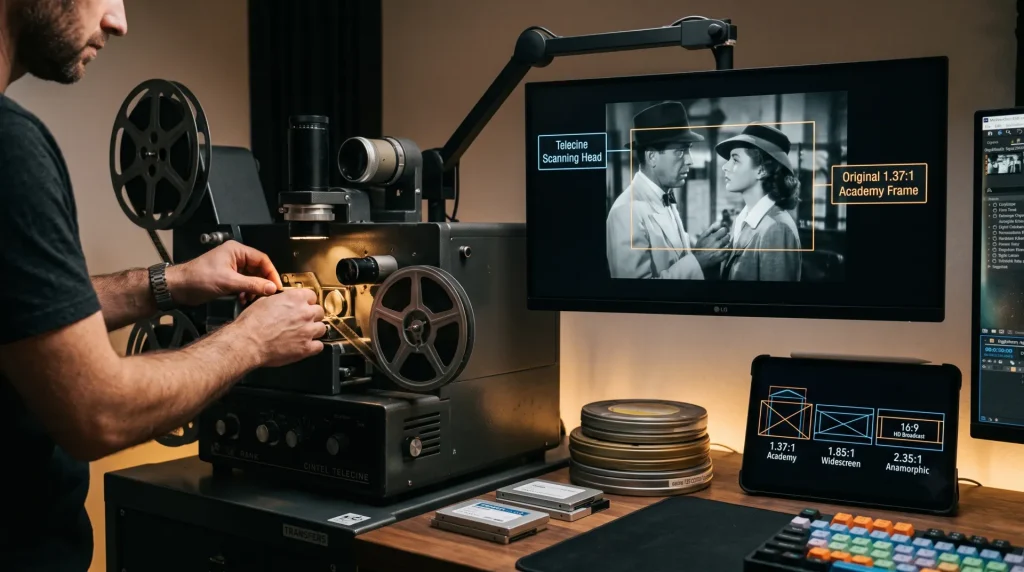
Historically, the work was done with a telecine system. A telecine scanned or photographed film frames and converted them into a television-compatible video signal.
Today, film is more often scanned at high resolution and processed in a digital restoration workflow. But the same core questions remain:
- What aspect ratio should the home version use?
- Should the full theatrical image be preserved?
- Should the image fill the screen?
- Will picture information be cropped?
- Is there extra image outside the theatrical frame?
- How should 24 fps film be converted for the delivery frame rate?
- How should grain, color, scratches, damage and camera negatives be handled?
Why Widescreen Films Exist
For much of the early sound-film era, many movies used an image shape close to 1.37:1, commonly called the Academy ratio. That shape is similar to the old 4:3 television ratio of about 1.33:1.wikipedia
When television became a major competitor for cinema audiences, movie theaters looked for ways to offer an experience that home TV could not easily match.
The industry responded with:
- Wider screens
- Larger projected images
- Color filmmaking
- Stereophonic and multichannel sound
- Curved screens and specialty formats
- Anamorphic widescreen photography
- Large-format film processes
Wide formats made landscapes feel larger, allowed more people or objects to fit into a shot, and gave directors another compositional tool.
But a wide cinema frame does not naturally fit inside an old square-shaped television screen.
Understanding Aspect Ratios
An aspect ratio describes the width of an image compared with its height.
For example:
- 1.33:1 means the image is 1.33 times as wide as it is tall.
- 1.37:1 is the classic Academy film ratio.
- 1.78:1 is modern 16:9 television.
- 1.85:1 is a common theatrical widescreen ratio.
- 2.39:1 is a common modern scope-style theatrical ratio.
| Aspect ratio | Common name or use | Visual shape |
|---|---|---|
| 1.33:1 | 4:3 television | Nearly square |
| 1.37:1 | Academy ratio | Classic 35 mm film frame |
| 1.66:1 | European widescreen | Moderately wide |
| 1.78:1 | 16:9 HDTV and streaming | Modern television |
| 1.85:1 | Flat theatrical widescreen | Common cinema format |
| 2.39:1 | Scope / anamorphic-style widescreen | Very wide cinema image |
Super 35 can support multiple extraction ratios, including 1.33:1 through approximately 2.35:1, depending on how the image is framed and finished.widescreen
Why Film-to-Video Transfers Were Hard
Old television sets usually used a 4:3 display shape. A 4:3 screen is much narrower than a 1.85:1 or 2.39:1 cinema image.
That created a problem.
If you preserved the full wide image, you got black bars at the top and bottom. If you filled the TV screen, you had to crop picture information from the sides, stretch the image, or use extra image outside the intended theatrical frame.
There was no perfect solution for every movie.
The right choice depended on how the film was photographed, how it was composed, what material survived, and what the director or studio approved for home release.
The Main Shooting Methods
A film’s original shooting process affects how it can be transferred to video.
The four historical methods below are especially important when discussing classic home-video releases.
Anamorphic Widescreen
Anamorphic photography uses special lenses to squeeze a wide image onto a narrower film frame during filming.
When projected in a theater, another anamorphic lens expands the image back to its intended wide shape.
The result is a very wide frame, often around 2.35:1 in older discussions and closer to 2.39:1 in modern terminology.
How Anamorphic Works
- The camera lens compresses the wide scene horizontally onto film.
- The film negative carries the squeezed image.
- A cinema projector uses a matching lens to expand the image.
- The audience sees the intended wide composition.
Anamorphic photography preserves the filmmaker’s wide composition, but it creates a major problem for 4:3 home video. The full wide frame cannot fill a narrow television screen without black bars, cropping, or distortion.
Common Home-Video Choices
For an anamorphic film, a distributor could choose:
- Letterboxing: Preserve the full width with black bars.
- Pan and scan: Crop the sides to fill a 4:3 screen.
- Center crop: Show only the middle portion of the frame.
- Stretching: Distort the picture to fill the screen; generally a poor choice.
A pan-and-scan transfer of a wide scope image can remove a substantial share of the original picture area. That is why many film fans preferred letterboxed releases.
Hard Matte Photography
Hard matting places a fixed mask over the image area during photography or printing. The top and bottom of the frame are intentionally blocked off to create a wider image.
A hard-matted image gives the filmmaker a defined theatrical composition. It also means the black bars are part of the intended frame.
Hard mattes were commonly associated with ratios such as 1.85:1 rather than very wide scope formats.
Hard Matte and Home Video
For old 4:3 television, a hard-matted movie could be transferred in two main ways:
- Preserve the full theatrical composition with letterboxing.
- Crop the left and right edges to create a full-screen version.
The first method keeps the intended composition. The second fills the screen but loses picture information.
Soft Matte Photography
Soft matte photography, also called open matte in some home-video contexts, records more image area on the negative than the audience sees in the theater.
During filming, the camera crew frames for a theatrical widescreen area. But the full camera negative may include extra picture above and below that area.
For a theatrical release, the projector mask creates the intended widescreen frame. For a 4:3 home-video release, a studio may expose more of the negative vertically.
Why Open Matte Can Be Controversial
An open-matte transfer can show more picture at the top and bottom. That sounds like a benefit, but the extra image was not always meant to be seen.
It can reveal:
- Boom microphones
- Lighting equipment
- Crew shadows
- Set edges
- Unfinished visual effects
- Marks or objects outside the intended frame
- Composition choices that look awkward outside the theatrical crop
The director and cinematographer may have designed the shot only for the theatrical frame. More visible image does not always mean a better presentation.
Super 35
Super 35 is a 35 mm production format that uses more of the available negative area than traditional sound-aperture photography.
It is flexible because filmmakers can shoot with one protected image area and later create different versions for theatrical release, television, and other formats.
Super 35 can be used to create wide theatrical images while preserving additional picture information for other delivery formats. It is commonly associated with aspect-ratio flexibility, including image areas that can support standard television and widescreen extractions.widescreen
Why Super 35 Helped Home Video
A Super 35 negative can allow a studio to create:
- A widescreen theatrical version
- A 4:3 pan-and-scan version
- A 16:9 television version
- A streaming or HD version
- Alternative reframed shots for different markets
However, this flexibility does not mean the full negative is always the preferred viewing area. The filmmaker may still have composed each shot for a specific theatrical frame.
Film Transfer Methods
Once a film is photographed, the distributor must decide how to present it on video.
Full Frame
A full-frame transfer fills a 4:3 television screen.
For movies photographed specifically in 1.33:1 or 1.37:1, this is simple. The film can be transferred with little or no reframing.
For a widescreen theatrical movie, “full frame” usually means one of the following:
- The image has been cropped at the sides.
- The transfer uses open-matte picture above and below the theatrical frame.
- The transfer was reframed shot by shot.
- The image was stretched or altered.
The phrase “full screen” does not automatically mean “full picture.”
Letterboxing
Letterboxing preserves the full width of a widescreen image by adding black bars above and below the picture.
For a 2.39:1 film shown on a 4:3 television, the image becomes smaller vertically, but the viewer sees far more of the original composition.
Letterboxing is often the best historical option when the goal is to preserve a movie’s theatrical framing.
Letterboxing on 16:9 Screens
Modern 16:9 televisions are much closer to common theatrical aspect ratios than old 4:3 sets.
A 1.85:1 movie nearly fills a 16:9 screen. A 2.39:1 movie still shows narrow black bars at the top and bottom, but those bars are much smaller than on a 4:3 television.
The bars are not missing picture. They protect the picture from being cropped or stretched.
Pan and Scan
Pan and scan is a method used to make a widescreen movie fill a narrower screen.
A transfer operator chooses a 4:3 section of the wider frame. That selected window can move left or right during a shot to follow people, objects, or action.
This is called “panning” and “scanning,” although the movement often happens in the transfer framing rather than through a new camera move.
The Benefit
Pan and scan fills a 4:3 screen and can keep the most important action visible.
The Cost
It removes image information from the sides.
In a very wide 2.39:1 film, a 4:3 version can lose a large portion of the original frame. The viewer may miss visual jokes, landscape detail, reactions, secondary characters, or deliberate wide compositions.
A dialogue shot with two people standing at opposite sides of a wide frame may become a sequence of separate close shots in a pan-and-scan transfer. That changes the original staging.
Center Crop
Center crop is a simpler version of pan and scan.
Instead of moving the selected 4:3 area, the transfer stays centered on the middle of the widescreen frame.
It is quick, but it can be a poor choice for films with action or important details near the left and right edges.
Stretching and Aspect-Ratio Distortion
Some transfers fill the screen by stretching or compressing the image.
This avoids black bars and cropping, but people and objects become unnaturally thin or wide.
Modern TVs often include “zoom,” “stretch,” or “fill” modes. These modes can distort a correctly framed image.
For the most accurate presentation, use your display’s original, native, or “just scan” aspect-ratio mode when available.
Open Matte Transfers
An open-matte transfer reveals more of the camera negative at the top and bottom of the frame.
This can be useful when a film was photographed with home-video protection in mind. It can also provide a different, sometimes interesting view of a film.
But open matte is not automatically the “complete” version.
| Transfer style | What you see | Main risk |
|---|---|---|
| Letterbox | The intended wide composition | Black bars on narrower screens |
| Pan and scan | A selected portion of the wide frame | Lost side information |
| Center crop | The center of the frame | Important side action may disappear |
| Open matte | Extra top and bottom image area | Crew, equipment or unintended image may appear |
| Stretch | A screen-filling image | Distorted people and objects |
Film Speed and Video Speed
Traditional motion-picture film usually runs at 24 frames per second, or 24 fps.
Older video systems used different rates:
- PAL: 25 frames per second
- NTSC: approximately 29.97 frames per second, historically interlaced
- SECAM: historically related to PAL-style 25 fps timing for this discussion
These differences required conversion.
PAL Speed-Up
A simple way to transfer 24 fps film to a 25 fps PAL system was to play the film 4.1667% faster.
The calculation is straightforward:
2425=1.041667
That means a 24 fps film runs about 4.17% faster at 25 fps.
This shortens the running time and raises the pitch of audio unless pitch correction is applied.
For every hour of original 24 fps material, the faster PAL version runs about 2 minutes and 24 seconds shorter.
PAL speed-up was widely used in standard-definition broadcast and disc workflows.avsforum+1
Why Some Viewers Noticed It
Many people did not notice PAL speed-up during ordinary dialogue scenes.
But it could be obvious in:
- Songs
- Musical films
- Familiar theme music
- Long sustained notes
- Movies watched repeatedly in different formats
Modern workflows can preserve audio pitch while changing speed, and streaming platforms generally avoid the old PAL conversion method by using frame-rate-aware digital delivery.
NTSC and 3:2 Pulldown
NTSC video historically ran at approximately 29.97 interlaced frames per second, or 59.94 fields per second.
Film was often transferred at approximately 23.976 fps, then converted using 3:2 pulldown.
The method repeats fields in a pattern so four film frames become five interlaced video frames.
A common simplified cadence looks like this:
| Film frame | Video-field display pattern |
|---|---|
| Frame A | 3 fields |
| Frame B | 2 fields |
| Frame C | 3 fields |
| Frame D | 2 fields |
The pattern repeats.
This preserves near-original playback duration, but it can introduce uneven motion called telecine judder, especially during slow horizontal camera pans.
3:2 pulldown historically converted roughly 24 fps film material into 29.97 interlaced video, with four film frames spread across five video frames.wikipedia+1
Why NTSC Motion Can Look Uneven
With 3:2 pulldown, not every film frame stays on screen for the same number of video fields.
That uneven timing can make smooth motion appear slightly irregular.
The effect is most visible in:
- Slow pans across buildings or landscapes
- Credits moving horizontally
- Long tracking shots
- Straight vertical lines moving across the screen
- Large objects crossing the frame at a constant speed
Modern displays may still show judder if content is converted poorly or displayed at a refresh rate that does not divide evenly into the film frame rate.
Modern Film Transfer Workflows
Today, film transfer is usually more digital than the older telecine workflows described above.
A modern restoration or remastering workflow may include:
- Inspecting the film negative, interpositive, print, or other surviving element.
- Cleaning and repairing the physical film.
- Scanning the film at 2K, 4K, 6K, or higher resolution.
- Stabilizing image movement where appropriate.
- Removing or reducing dirt, scratches, flicker and damage.
- Restoring color under the supervision of qualified artists or filmmakers.
- Selecting the approved aspect ratio.
- Creating HDR and SDR grades when needed.
- Encoding versions for cinema, disc, broadcast and streaming.
- Checking subtitles, audio sync, frame rate and final quality control.
The essential principle remains the same: preserve the filmmaker’s intended presentation whenever the original materials and approval process allow it.
Which Version Should You Watch?
There is no universal answer. The best version depends on the film, the available source material, and what you want from the viewing experience.
Choose a widescreen or letterboxed version when you want to see the theatrical composition.
Choose an open-matte version when you are interested in additional vertical picture area, but remember that it may show material not intended for theatrical viewing.
Choose a full-frame pan-and-scan version only when that is the available release or when the reframed version has a specific historical or filmmaker-approved purpose.
For most modern televisions, avoid using screen-stretch modes. A 16:9 display already fits many widescreen movies well, while a 2.39:1 film should retain its small black bars.
Frequently Asked Questions
What is film transfer to video?
Film transfer to video is the process of converting film footage into a television or digital video format. It involves choices about frame rate, aspect ratio, cropping, color, restoration and final delivery format.
Why do old movies have black bars?
Black bars often appear because the movie was filmed wider than the shape of the television screen. The bars allow the full original image width to remain visible instead of cropping the sides.
Is letterbox better than pan and scan?
Letterboxing usually preserves more of the original widescreen composition. Pan and scan fills a narrow screen but may remove important visual information from the sides of the frame.
What is an open-matte transfer?
An open-matte transfer reveals image area above and below the theatrical widescreen frame. It can show more of the negative, but it may also reveal microphones, set edges, crew equipment or unfinished effects.
Why did PAL movies run faster?
Traditional PAL video ran at 25 fps while film commonly ran at 24 fps. A simple conversion played the film about 4.17% faster, making the running time shorter and raising audio pitch unless corrected.delx+1
What is 3:2 pulldown?
3:2 pulldown is a historical NTSC conversion method that spreads four film frames across five interlaced video frames. It allowed near-24 fps film to be shown at approximately 29.97 fps but could create visible motion judder.wikipedia+1
Does modern streaming still use PAL speed-up?
Usually not in the same way. Modern streaming services can deliver content at frame rates closer to its original source, though final playback still depends on the app, device, display refresh rate and regional delivery workflow.
Related Guides
- What Happened to DigiEffects? A History of the Legacy Plugin Brand
- DigiEffects Aged Film: Legacy Film Damage Effect
- How to Recreate an Aged Film Look in After Effects and DaVinci Resolve
- How to Recreate the Damage Glitch Effect in Modern After Effects and DaVinci Resolve
- DigiEffects Plug-ins Compatibility Guide for After Effects and Premiere Pro