In the landscape of early desktop video production, DigiEffects was primarily known for two things: breaking imagery with Damage and simulating nature with Phenomena. But there was a third, equally influential, pillar in their software lineup that targeted a completely different artistic intent.
While Damage was essential for grunge and Delirium was king of atmospherics, DigiEffects Tweak was the playground for mathematical, psychedelic, and purely abstract motion design.
Originally launched in the late 1990s and evolving into a core component of the Delirium super-suite, Tweak gave motion graphics artists a palette of mathematical, procedural noise, and vector distortion tools that standard host applications couldn’t dream of replicating at the time. Here is a historical look at the architecture of DigiEffects Tweak and the specific tools that defined its fringe, experimental aesthetic.
The Abstract Alternative: Procedural Art on the Desktop
When DigiEffects Tweak first appeared, After Effects (AE) was still finding its identity. It was a tool mostly used by editors for simple multi-layer compositing and basic title animation. Tools for generating abstract motion from scratch—like AE’s built-in Fractal Noise—were either missing entirely or were slow, single-threaded CPU operations.
Tweak changed the goal from simulation to pure creation. By packaging complex mathematical algorithms into intuitive plugins, DigiEffects allowed artists to generate thousands of shifting patterns, kaleidoscopic distortions, and synchronized visual noise without manually animating a single layer.
It was an immediate hit in high-energy production environments: music videos, club visuals, television network rebrands, and any project that demanded complex, rhythmic, high-saturation imagery.
| Legacy Plugin | Primary Procedural Aesthetic | AutoAnimate Support? | Modern Alternative Hook |
| Crazy Stripes | Infinite, scrolling vector bars & patterns | Yes (Automated Speed) | Shape Layers + Repeater |
| Crystallizer | Cellular, stained-glass spatial subdivision | Yes (Automated Evolution) | Cell Pattern + Colorama |
| Hyper Harmonizer | Multi-layer, chaotic visual noise fields | Yes (Automated Density) | Turbulent Noise stack |
Deconstructing the Tweak “Holy Trinity”
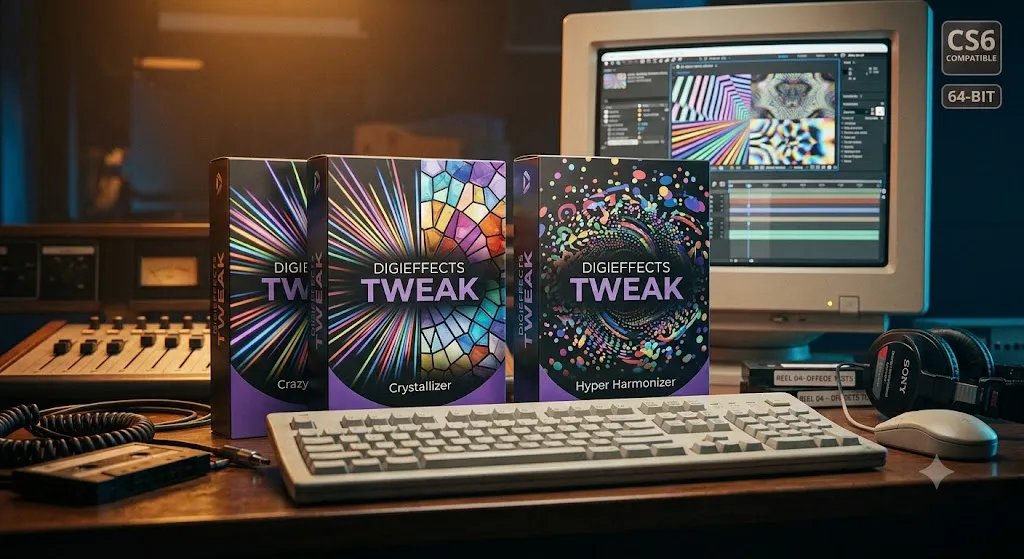
The Tweak collection eventually grew to include dozens of specialized tools, but three key plugins defined the entire suite’s historical legacy.
1. Crazy Stripes: The Foundation of Psychedelic Graphics
Crazy Stripes was, and remains, the signature tool of the entire Tweak collection. At its core, it was a specialized generator for vector-like, shifting lines.
What made it unique was how simple it made complex, synchronized animation.
- Variable Stripe Count: Users could shift from a single line to thousands of ultra-fine parallel bars.
- Color Cycle Control: It possessed an integrated color ramp tool, allowing stripes to smoothly cycle through complex, high-saturation color palettes as they animated.
- AutoAnimate Sync: Stripes could be automated to scroll, pulse, or shift colors in perfect sync without keyframes. By applying crazy stripes to multiple layers set to different blending modes, artists created incredibly dense, shifting optical textures.
2. Crystallizer: The Stained-Glass Geometric Breakdown
Crystallizer targeted a very specific spatial distortion. Rather than blurring or pixelating a layer, Crystallizer performed a procedural mathematical subdivision of the frame, turning any image into a mosaic of fractured, shifting, geometric cells.
The effect looked remarkably like stained glass or a kaleidoscope. By using the automated evolution controls, these cell patterns would shift and morph smoothly. Applying this effect on top of standard video or motion graphics created an immediate sense of geometric fragmentation, making it a favorite tool for transition sequences and complex background texture generation.
3. Hyper Harmonizer: The Rhythm of Visual Noise
Hyper Harmonizer was essentially a rhythm engine for visual noise. It generated fields of multi-layered, abstract shapes—dots, dashes, squares, and blobs—that could be animated in intense, chaotic bursts.
The primary control was “Density.” By animating the density slider, an artist could shift a texture from a minimalist field of a few shapes into an overwhelming, synchronized visual feedback loop. When combined with the integrated color-cycling engine, Hyper Harmonizer became an essential tool for creating fast-cut club visuals or visualization sequences for high-bpm electronic music tracks.
Architectural Legacy: Speed, Automation, and Math
From a software engineering perspective, DigiEffects Tweak succeeded because it maximized the very limited CPU resources available to artists in the 32-bit era.
Optimization for Speed
Procedural mathematics—generating patterns based on pure code rather than heavy stock assets—was incredibly lightweight. Crazy Stripes or Hyper Harmonizer could generate highly detailed 1080p graphics faster than many hosts could render simple titles at the time, specifically because they were purely math-driven and heavily optimized for the 32-bit CPU pipelines of PowerPC and early Intel processors.
Integrated Motion Without Keyframes
We discussed this during our deep dive into Delirium, but it bears repeating here: the AutoAnimate engine was critical to Tweak’s success. Motion graphics artists often worked in environments where manual keyframing of every evolution or phase parameter was impossible due to tight deadlines. Tweak automated this, letting artists focus on aesthetic experimentation rather than parameter management.
System Compatibility Matrix & Legacy Status
If you have legacy project files from the late 90s or mid-2000s that use Crazy Stripes, Crystallizer, or Hyper Harmonizer, opening them today on modern workstations requires careful planning.
| Environment | Suite Version | Host Compatibility | Recommended Action |
| Windows XP / 7 (32-Bit) | DigiEffects Tweak v1.x / v2.0 | AE 5.0 – CS4 | Fully Native: Ideal for legacy workstation restoration. |
| Windows 7 / 10 (64-Bit) | Tweak v2.5 / v2.6 | AE CS5 – CS6 | Functional: Requires legacy CS6 host environment. |
| Windows 11 (64-Bit) | Any Version | Modern AE 2024–2026 | Incompatible: Baking layers on a legacy rig or full recreation needed. |
| macOS Apple Silicon (ARM) | Any Version | Modern AE 2024–2026 | Incompatible: Full recreation using modern native tools. |
The Reconstruction Workflow: Recreating “Tweak” in modern 64-bit AE
Today, you do not need obsolete plugins to recreate the Tweak aesthetic. Modern host tools—particularly the native integration of Shape Layers and After Effects Expressions—are far more powerful and GPU-accelerated.
- Replacing “Crazy Stripes”: Create a standard Shape Layer containing a single vertical bar. Use the Repeater operator to duplicate the bar across the frame. Then, apply a simple
time * 200expression to the X-Position offset. This recreates the Crazy Stripes aesthetic with infinite native resolution and GPU acceleration. - Replacing “Hyper Harmonizer”: Layer two or three instances of the built-in Turbulent Noise effect. Set their noise types to “Block” and “Spline” at different scales, set their blending modes to Linear Dodge (Add) or Screen, and apply active evolution expressions to make them drift and shift.
Summary
DigiEffects Tweak was a pioneer of procedural abstract motion design on the desktop. By proving that complex mathematical patterns, kaleidoscopic distortions, and synchronized noise fields could be generated quickly and intuitively without manual keyframing, Tweak set the template that drives modern abstract motion graphics tools, shape layers, and procedural expressions today.